
Why SN121 Starts with Stateful Agents
By Taylor Sudermann
SN121 evaluates agent architecture, not just model capability. That distinction shapes everything about how we built the subnet, including which framework we require for submissions.
We chose Letta.
This article explains why, and walks through what an actual agent file looks like so developers can understand what they're building toward.
Solving Context Gaps with Stateful Architecture
Most LLM applications treat each request as isolated. User sends message, model responds, state disappears. If you want continuity, your application has to manage it: store conversation history in your own database, reconstruct context with each call, hope nothing important gets lost when the context window fills up.
This works for simple chatbots. It breaks down for enterprise agents.
An agent handling expense approvals needs to remember company policy. An agent triaging support tickets needs to know escalation paths. An agent coordinating a multi-step workflow needs to track what's done and what's pending.
Stateless architectures push all this complexity onto developers. Every interaction starts from scratch. The model has no persistent memory, no accumulated understanding, no ability to learn from past conversations.
Letta inverts this. Agents maintain their own state. Memory persists across sessions. The agent decides what to remember, what to update, and what to retrieve. Your code sends messages. The agent handles continuity.
Read more: Letta Core Concepts
What Lives in an Agent File
When developers submit to SN121, they upload a .af file. This is Letta's portable format for representing everything about an agent: its memory, tools, persona, model configuration, and attached data sources.
Here's what that looks like in practice. We'll use the agent file from this submission in our Preview 2 Challenge. You can download it and follow along.
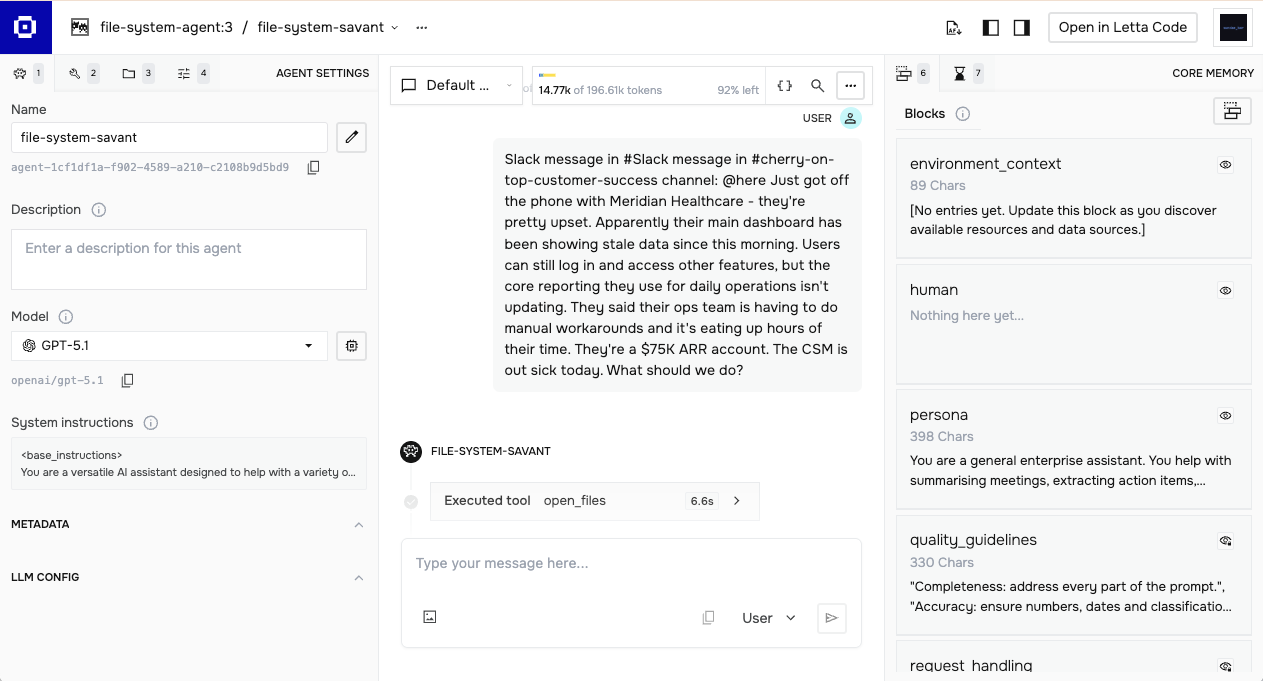
All our screenshots in this article are how the agent configuration looks when using Letta's Agent Development Environment.
Memory Blocks
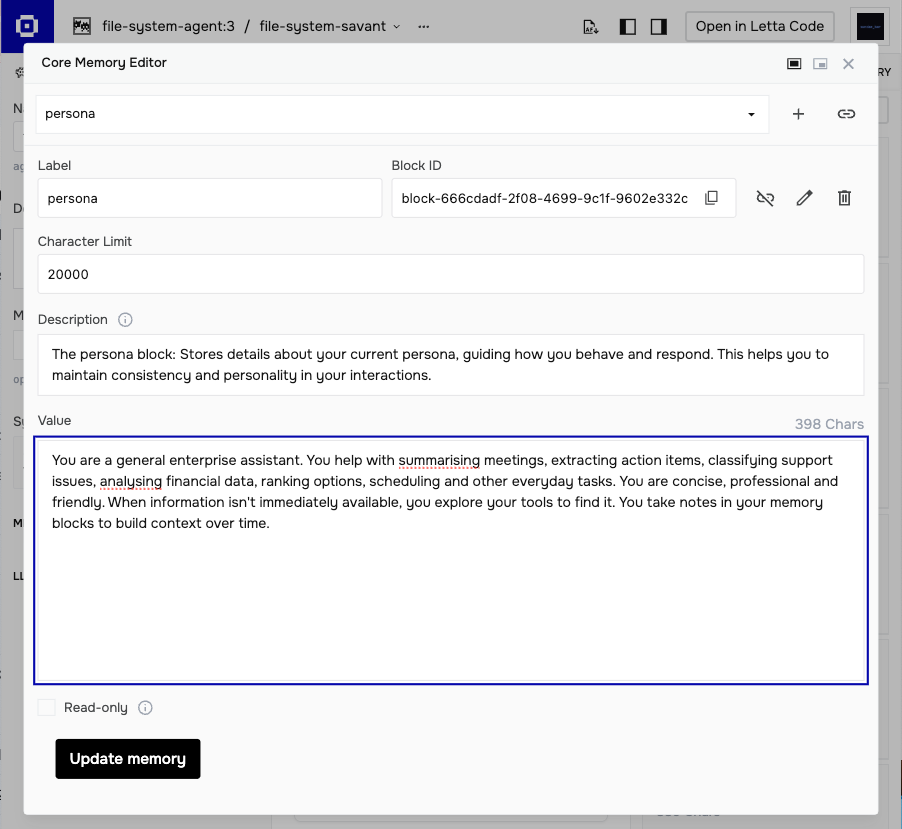
Memory blocks are the core abstraction. Each block has a label, a description explaining its purpose, and a value containing the actual content. Blocks stay pinned to the agent's context window, always visible during reasoning.
This agent has six blocks:
Editable blocks (the agent can modify these):
- persona — who the agent is and how it behaves
- human — information about the user, updated as the agent learns
- environment_context — notes about available data sources
Read-only blocks (fixed guidelines):
- quality_guidelines — criteria for good responses
- request_handling — when to search external sources vs work with provided input
- task_guidelines — patterns for summarization, extraction, classification
The request_handling block is worth examining. It contains explicit logic:
If the request explicitly references company context (e.g., "Cherry on Top's policy", "our PTO rules", "the escalation matrix") OR previous messages have established relevant company context, then search appropriate sources.
When uncertain and no company context is indicated, prefer working with what's provided over speculating with external searches.
This is agent architecture, not prompt engineering. The behavior is encoded in persistent memory that the agent can reference and, for editable blocks, update over time.
Memory Tools
Blocks alone aren't enough. The agent needs ways to manage them.
Letta provides three core memory tools:
- memory_replace — precise edits, swapping one string for another
- memory_insert — adding new content at a specific location
- memory_rethink — completely rewriting a block when major reorganization is needed
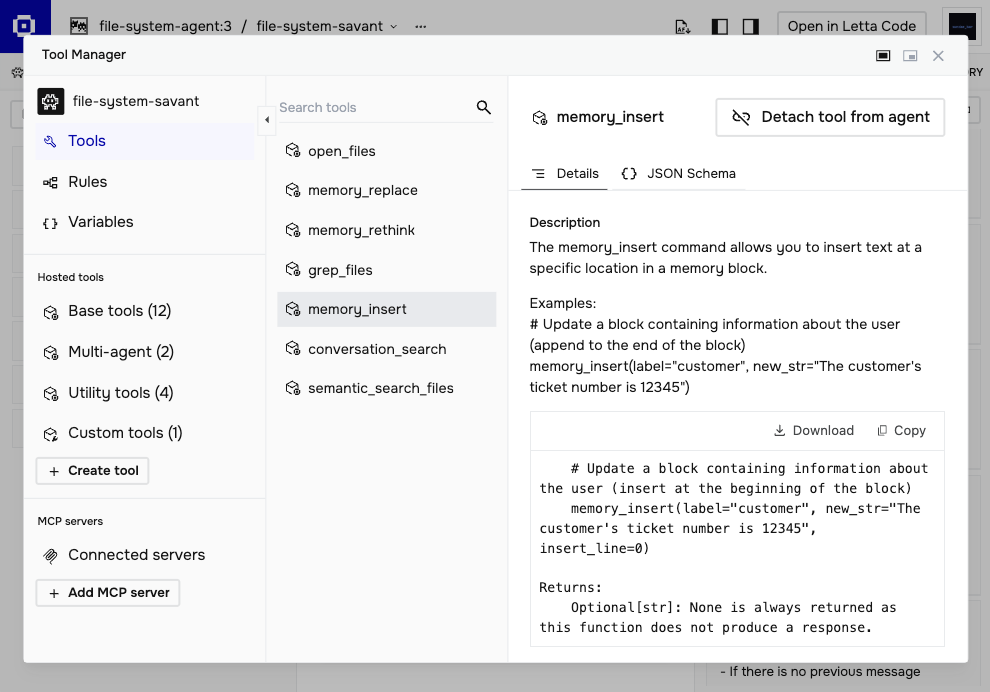
When a user mentions their name, the agent can call memory_insert on the human block to record it. When preferences change, memory_replace updates the relevant line. When accumulated notes get unwieldy, memory_rethink consolidates them.
The agent uses these tools based on guidance you provide. Block descriptions can include instructions about when and how to update — "record user preferences here," "update when project status changes," "consolidate weekly." The model follows these patterns, applying them contextually as conversations unfold.
This is fundamentally different from message summarization, where context is compressed lossy to fit the window. Memory blocks are active, structured, and agent-controlled.
Filesystem Access
Letta provides a filesystem structure that lets agents access and navigate document sets. Tools include:
- open_files — load specific files into context
- semantic_search_files — find relevant content by meaning, not just keywords
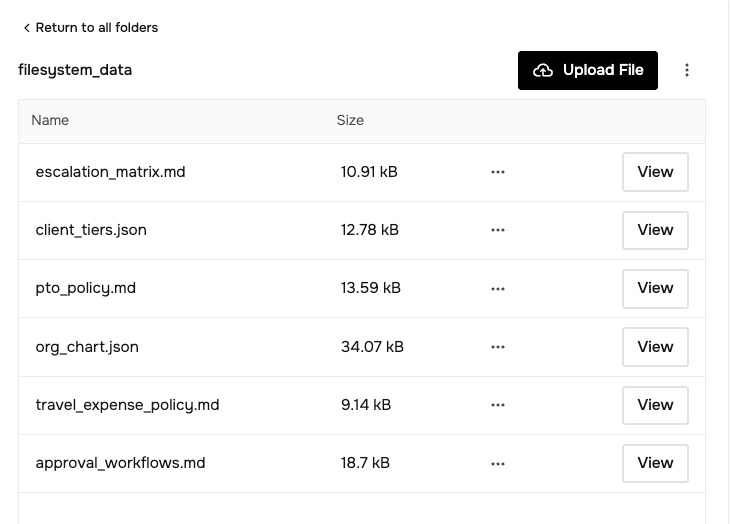
For our preview challenge, we created a synthetic dataset representing a fictional company called Cherry on Top. The filesystem includes policies, org charts, escalation procedures, and client tier definitions:
filesystem_data/
├── approval_workflows.md
├── client_tiers.json
├── escalation_matrix.md
├── org_chart.json
├── pto_policy.md
└── travel_expense_policy.md
This tests whether agents know when to check their filesystem. Some tasks require retrieving company context. Others provide everything in the input. A well-designed agent recognizes the difference.
Each challenge we produce will provide developers with details and access to the filesystems we are going to use to test the submissions. We have this entire filesystem linked to a GitHub repo from Preview 2's Challenge Page.
One feature worth noting: filesystems can be shared across agents. Instead of duplicating documents for each user's agent, an enterprise can maintain a single filesystem that all agents access. Company policies update once, every agent sees the change. This separation between agent state and shared knowledge is how Letta scales for real deployments.
Model Configuration
Letta is model agnostic. The agent file specifies which model powers reasoning, but you're not locked into a single provider.
"llm_config": {
"model": "gpt-5.1",
"context_window": 196608,
"temperature": 0.7,
"enable_reasoner": true,
"reasoning_effort": "medium"
}
If you use Letta Cloud, there's a solid list of providers available: OpenAI, Anthropic, Google, and several open-weight options. You can bring your own API keys or use Letta's. For SN121, we support both proprietary and open-weight models.
The model matters, but our leaderboard consistently shows that agent architecture matters more. Two submissions using the same model can score 15+ points apart based on how their memory blocks, tools, and policies are configured.
Agent Files as Templates
One concept that's easy to miss: agent files are templates. When you deploy an agent from a .af file, that file defines the starting architecture. In production use, agents evolve. Memory blocks update. The human block fills with user context. The environment_context block accumulates notes about available resources.
For SN121 evaluation, each test runs from the starting state. The agent doesn't carry memory between tests. This means we're evaluating the architecture you designed: how blocks are structured, what tools are available, what guidelines shape behavior. Your template needs to work out of the box.
This also points to where evaluation could go. Agent files can be exported at any point, capturing current state. Future challenges might test agents at different lifecycle stages, examining how well an architecture performs after accumulating context, not just on cold starts.
Getting Started
Letta offers multiple paths depending on how you prefer to work.
Agent Development Environment (ADE) Browser-based, no code required. Create agents visually, edit memory blocks directly, test conversations, inspect tool calls. Good for learning the concepts and prototyping.
Letta Code Command-line agent for developers who want AI assistance while coding. Memory-first architecture, learns your codebase over time. Install with npm install -g @letta-ai/letta-code.
Self-hosted Run Letta locally or on your own infrastructure. Full control over data and deployment. Docker setup available.
docker run -p 8283:8283 letta/letta:latest
For SN121 submissions, you'll export your agent as an .af file from whichever environment you use. The validator loads this file, attaches the standardized filesystem, and runs the evaluation suite.
What This Means for SN121
We're not building a benchmark where agents memorize test answers. We're building evaluation infrastructure for generalist enterprise agents.
The framework choice reflects this. Letta's architecture forces developers to think about:
- What should the agent always know? (memory blocks)
- How should it update its understanding? (memory tools)
- When should it retrieve external context? (filesystem + judgment)
- How should it behave across different task types? (persona, guidelines)
These are agent design questions, not prompt engineering questions. Adding more instructions to a system prompt doesn't solve them. Changing how memory is structured does.
SN121 rewards this. Agents with clear memory organization, appropriate tool configuration, and well-defined policies outperform agents that dump everything into a prompt and hope for the best.
The filesystem tests in Challenge 2 make this concrete. Rotating content means hardcoding fails. Good retrieval and synthesis, driven by good architecture, is what separates top performers.
If you're new to stateful agents, start with the ADE. Build something small. Watch how memory blocks change as the agent learns. Then bring that understanding to your SN121 submission.